blog

Boost Efficiency with Strategies for Smarter Workflows

Posted January 29, 2026 by Jennifer G

In busy dental practices, efficiency goes beyond saving time—it supports better patient experiences, reduces staff burnout, and creates space for higher-quality care. As administrative demands grow and patient expectations rise, practices that streamline workflows are better positioned to meet both. These proven methods and modern tools are designed to streamline workflows, with actionable steps you can implement today.

Automate Routine Administrative Work

In a dental office, the front desk often spends more time on paperwork, phone calls, and scheduling than on patient care. Automating repetitive tasks helps reduce errors, decrease stress, and gives your team more time to support patients in the chair.

Administrative work is one of the biggest drains on staff time. Automating routine tasks helps eliminate manual errors and frees your team to focus on patient care.

Automation opportunities:

  • Appointment reminders: Send automated texts, emails, or calls to reduce no-shows and last-minute cancellations.
  • Follow-ups and recalls: Automate post-treatment instructions, hygiene recalls, and overdue appointment notifications.
  • Online booking: Allow patients to schedule appointments anytime—cutting down on phone traffic and easing front-desk workload

Practical takeaway:

Pick one task that consumes a lot of staff time—such as appointment reminders—and automate it first. Track your no-show and cancellation rates to see quick improvements.

Build Skills Through Ongoing Team Training

In a dental practice, efficiency depends on how confidently your team uses the tools at their fingertips. Without consistent training, even the best technology can slow workflows and create frustration. Investing in education helps teams work more smoothly, reduce errors, and adapt quickly as systems evolve.

Best practices:

  • Provide structured onboarding for new front-desk, hygiene, and clinical staff, with documented workflows they can reference.
  • Offer periodic training sessions to reinforce best practices and introduce new features or process improvements.
  • Cross-train team members so scheduling, check-in, and clinical support continue seamlessly during peak times or staff absences.

Practical takeaway:

Designate a go-to team member for each core system who stays up to date on changes and serves as a resource for the rest of the practice.

Simplify Clinical Notes with AI Technology

Documenting exams, procedures, and treatment discussions takes valuable time away from patient care. AI-driven transcription and note creation tools can capture clinical details automatically, helping providers stay focused on patients instead of screens.

Benefits for dental teams include:

  • Converts chairside conversations into organized, accurate clinical notes.
  • Minimizes end-of-day charting and reduces after-hours work.
  • Creates more consistent documentation across providers and appointments.

Practical takeaway:

Start by using AI documentation tools with a small group of providers, then expand practice-wide once the process feels natural and efficient.

Improve Prescribing with Integrated ePrescribing

Prescribing medications should be fast, accurate, and safe. Integrated ePrescribing tools simplify the process by keeping everything within your clinical workflow while helping reduce errors and delays.

Benefits of efficiency include:

  • Quicker prescription delivery to pharmacies with fewer follow-up calls.
  • Built-in access to medication histories, allergy alerts, and drug–drug interaction checks.
  • Less time spent on handwritten scripts, faxing, or re-entering information.

Practical takeaway:

Take a close look at how prescriptions are handled today and identify opportunities where integrated ePrescribing can replace manual steps and improve safety and efficiency.

Give Patients More Information with Patient Portals

Patient portals help dental practices streamline everyday tasks while giving patients easy, secure access to their information. By moving routine interactions online, practices can reduce front-desk workload and create a smoother, more modern patient experience.

High-value portal features:

  • Online registration and forms completed before appointments to speed up check-in.
  • Secure access to clinical information, treatment details, and visit history.
  • Simple, secure online bill pay to make payments more convenient for patients.

Practical takeaway:

Encourage portal use during check-in and check-out—when staff actively promote it, patient adoption and engagement increase significantly.

Final Takeaways

Improving workflow efficiency isn’t about cutting corners—it’s about making smarter use of time and technology. By bringing together automation, ongoing staff training, AI-powered clinical tools, and patient-centered solutions, practices can streamline operations, enhance care quality, and deliver a better experience for both patients and staff.

Posted in: Dental Practice Management Software, Dental Software, Dental Technology, XLDent Patient Experience, Leave a comment/ No Comments »
Tagged : ,,,,

World Backup Day: Safeguarding Your Practice’s Future

Posted March 25, 2024 by Jennifer G

As World Backup Day approaches on March 31st, it’s an opportune moment for businesses, especially dental practices, to reflect on the critical importance of data backup. In today’s digital age, data is not just a part of our daily operations; it is the backbone of our businesses, holding everything from patient records to financial information. The loss of such data can be catastrophic, making backup practices not just advisable but essential.

Why Backup is Crucial

The significance of backing up data cannot be overstated. It’s about protecting your practice against the unforeseen—be it cyberattacks, hardware failures, natural disasters, or even simple human errors. Data loss can lead to significant downtime, loss of patient trust, and in severe cases, the closure of practices. A robust backup strategy ensures continuity, security, and peace of mind.

Best Practices for Data Backup

  • Regular Backups: Implement a schedule for regular backups, ideally daily. Consistency ensures that, in the event of data loss, the most recent data is recoverable with minimal loss. 
  • 3-2-1 Backup Rule: This rule suggests having three total copies of your data, two of which are local but on different devices, and one copy off-site. It ensures that if one backup fails, you have alternatives. 
  • Test Your Backups: Regularly testing your backups to ensure they can be restored is crucial. There’s no point in backing up data if it can’t be recovered when needed. 
  • Secure Your Backups: Encrypt your backup data and ensure it’s protected against unauthorized access. This is especially important for sensitive patient information. 
  • Choose the Right Solution: Not all backup solutions are created equal. It’s vital to select a service that aligns with your practice’s specific needs, considering factors like ease of use, reliability, and the level of support provided.

How XLDent Enhances Your Practice’s Data Security

XLDent takes data backup to the next level with XLBackup, our managed and fully automated, online, off-site service designed with dental practices in mind. Recognizing that every practice is unique, we’ve tailored our solution to offer the following benefits: 

  • Automated Backups: Scheduled daily, XLBackup ensures that your data is consistently up-to-date without requiring manual intervention, freeing your staff to focus on patient care. 
  • Compatibility: Whether you’re using XLDent Practice Management Software or other practice or imaging software, XLBackup is designed to work seamlessly, providing a versatile solution to all dental practices. 
  • Managed Service: Our team of experts, well-versed in the dental industry, manages the backup service, offering peace of mind and ensuring that your backups are conducted efficiently and effectively. 
  • Routine Audits: We conduct regular audits with each client to ensure that XLBackup meets your practice’s evolving needs, offering a personalized approach to data backup. 
  • Disaster Recovery: In the event of data loss, XLBackup’s off-site storage and easy restoration capabilities ensure that your practice can quickly recover, minimizing downtime and protecting your reputation. 

As World Backup Day reminds us of the importance of data protection, it’s crucial to choose a backup solution that not only meets today’s needs but also adapts to future challenges. XLDent’s commitment to providing a secure, reliable, and user-friendly backup service means that your practice can face the future confidently, knowing your data is in safe hands.

Posted in: Dental Software, Dental Technology, Dental Web-based Solutions, Electronic Dental Records, Leave a comment/ No Comments »
Tagged : ,,,,,,

Strategies to Increase Appointments in Your Dental Practice

Posted February 26, 2024 by Jennifer G

As a dental professional, your top priority is providing quality care to your patients. However, to guarantee the success and growth of your dental practice, it is essential to maintain a continuous flow of appointments. In this blog post, we will discuss effective strategies to increase appointments in your dental practice.

Embrace Technology for Easy Booking

Patients expect convenience and efficiency when it comes to scheduling appointments. Integrating innovative dental software solutions, such as XLDent, can simplify your booking process and enhance the patient’s experience. With online appointment scheduling, patients can easily book appointments at their convenience, reducing the time-consuming phone calls.

Optimize Your Online Presence

Your dental practice’s online presence is vital in attracting new patients. Ensure that your website is user-friendly, mobile-responsive, and provides all the information needed about your services, location, and contact details. Implement search engine optimization (SEO) techniques to improve your visibility in online searches. Use social media platforms to connect with potential patients and share valuable content that highlights your expertise. Paid advertising campaigns on social media platforms can help you target specific demographics and reach a wider audience.

Participate in Local Marketing

Employing targeted local marketing strategies can successfully attract new patients to your dental practice. Create partnerships with local businesses, such as gyms, schools, or community centers, and offer exclusive deals or promotions. Join local organizations and participate in community events to build relationships and increase awareness about your practice.

Encourage Patient Referrals

Word-of-mouth recommendations remain one of the most powerful marketing strategies in any industry, including dentistry. Provide exceptional patient experiences and encourage satisfied patients to refer your practice to their family and friends. Consider implementing a referral program that offers incentives to both the referring and new patient. This will not only increase appointments, but also boost patient loyalty.

Offer Special Promotions

We believe in the power of special promotions to attract potential patients. Expand your reach by offering discounted teeth whitening, free consultations, or an exclusive package deal for new patients. Take advantage of innovative software solutions such as XLConnect to simplify these promotional offers and make scheduling appointments easier. Get ready to see your practice succeed.

Implement a Recall System

A recall system is essential to ensure that patients return for their regular checkups and cleanings. Dental software solutions such as XLDent allow you to automate patient recall notifications via email, text, or phone calls. This approach not only keeps your schedule full but also emphasizes your commitment to preventive care. It also helps foster long-term relationships with your patients, as they see you as a trusted partner in their dental care journey.

Optimize Your Treatment Offerings

Expanding your range of services can attract a broader patient base and increase appointment bookings. Stay informed about the latest advancements in dental treatments and technologies, and consider adding services like orthodontics, cosmetic dentistry, or implant dentistry to your practice. By diversifying your offerings, you position your practice as a one-stop solution for complete dental care.

Enhance Patient Communication

Establishing clear and effective communication channels with your patients is vital for maintaining their trust and satisfaction. Use patient communication tools, such as automated appointment reminders, treatment plan explanations, and post-treatment follow-ups. Show genuine empathy, listen to your patients’ concerns, and address them appropriately. Putting your patients at ease and building strong relationships will contribute to a steady flow of appointments.

Increasing dentist appointments requires a combination of technology, marketing, patient engagement, and initiative-taking communication. Embrace the power of dental software solutions like XLDent to reorganize your booking process and enhance patient satisfaction, with features like automated reminders, patient notifications, and online booking capabilities, you can simplify the appointment process.

Utilize digital marketing strategies to expand your online presence and attract new patients. Also, utilize search engine optimization (SEO) techniques to improve your website’s visibility. By implementing these strategies, you can lay the foundation for a successful dental practice that puts patient care at the top of your priorities while achieving sustainable growth.

Posted in: Dental Practice Management Software, Dental Software, Dental Technology, Dental Web-based Solutions, Marketing Services, Recare System, XLDent Patient Experience, Leave a comment/ No Comments »
Tagged : ,,,,,,

Credit Card Payment Processing: What You Need To Know

Posted July 20, 2022 by Jennifer G

The act of paying for something with a credit card is seamless. First, swipe or insert a card into a machine. Then, wait for the authorization to happen. Lastly, sign off on the purchase, if needed. All of this happens in a few seconds.

However, a lot goes on behind the scenes while you’re waiting for that quick authorization! We’ll discuss what happens when you enter your card, in addition to the security measures that are in place to protect your data long after you make a purchase.

Who takes part in the credit card payment process?

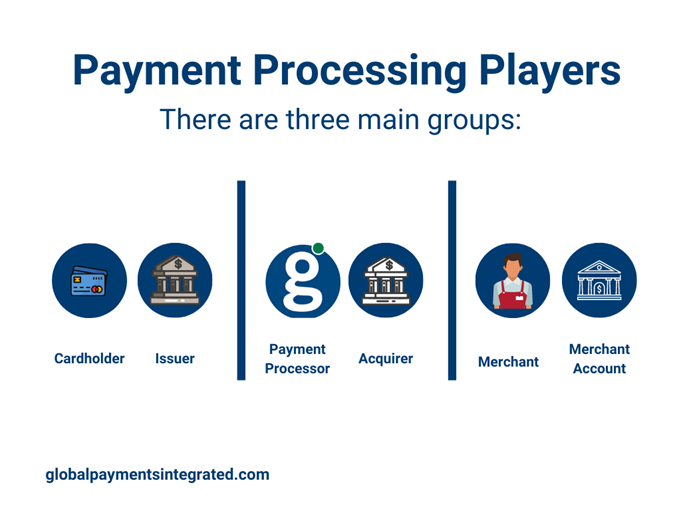
The players involved in the payment process include:

Cardholder: This is the customer that presents their card for payment of goods or services.

Issuer: The issuer (or “issuing bank”) provides the cardholder with their credit and a physical card. They are responsible for approving and declining transactions, customer billing, and collections.

Merchant: This is the business that sells goods or services.

Merchant Account: This is a type of bank account that allows businesses to accept credit, debit, and mobile payments. 

Acquirer: An acquirer (or “acquiring bank”) solicits, underwrites, and owns the accounts merchants need to accept credit cards. They can provide the technology permitting businesses to process transactions, take on chargeback risk, and deposit funds into a merchant’s bank account.

Payment Processor: Payment processors are organizations that partner with acquirers to open merchant accounts, handle support, manage payment processing, and build technology on behalf of acquirers.

Facilitating the payment process

Credit Card Machines

First, a credit card reader or terminal is needed. Today, there are various credit card machines available that can cater to any processing environment. 

Popular devices include point-of-sale (POS) terminals, which support credit cards with magnetic stripes and chips. Some are magnetic stripe (“magstripe”) only, in addition to devices specially made for an unattended or kiosk type of environment.

Near-field communication (NFC) readers are payment terminals that allow tap-to-pay capabilities for contactless credit cards and mobile wallets. 

Payment Methods

The payment transaction starts when the cardholder presents one of the following:

EMV chip card: A payment card containing a computer chip that can validate personal identification numbers (PINs), authorize purchases, verify account balances, and store personal records. Chip cards facilitate EMV® payment processing throughout Europe and the US.

Contactless card: A credit or debit card that does not require physical contact between the card and the credit card machine.

Digital wallet: Digital wallets store a cardholder’s payment information on a mobile app or smartphone device, enabling payment to happen without a physical credit card. Examples include Samsung Pay®, Apple Pay®, Google PayTM, and Fitbit PayTM.  

How does credit card processing work?

Once the card is entered into or “tapped” on the credit card machine, the authorization begins. Authorization is the process where the issuer approves or declines a transaction. Merchants use it to ensure customers have sufficient funds available when they purchase something.  

  1. The credit card information enters a payment gateway, which serves as a connector between the merchant and a payment processor (like Global Payments). 
  2. The payment processor will take this information and send it to the card brand (such as Visa or Mastercard). 
  3. The card brand sends this information to the issuer.

When the issuer receives the cardholder’s information, authentication begins.

  1. The issuer will verify that the cardholder has sufficient funds in the credit line to approve the transaction. 
  2. They may also check the card verification value (CVV) and ensure the billing address matches what is on file to prevent fraud.
  3. If the transaction is approved, the merchant receives authorization, and the issuer places a hold for the amount of the purchase on the customer’s account. The card reader or POS terminal should see a message that says, “Approved.”
  4. The merchant gives the cardholder a receipt at the end of the sale.

At this point, the payment verification process is complete.

How long does a credit card payment take to process?

Payment verification only takes a few seconds at the point of sale. Then, the payment process continues behind the scenes with the settlement process.

  1. Merchants send all approved transactions to the acquirer at the end of the day. This group of transactions is called a batch.
  2. The payment processor routes the batch to the card branch for settlement.
  3. The card brand forwards the transactions to the issuer.
  4. The issuer transfers the funds to the acquirer, and in the process, takes an interchange. Card brands set the interchange fee, and the acquirer is responsible for paying this fee to the issuer.
  5. The acquirer credits the merchant’s account with the approved transactions.
  6. The issuer posts the transaction on the cardholder’s account. The cardholder will be responsible for settling their debt at the end of their billing cycle.

Payment processing times vary, but on average, it takes one to three days. Additionally, batches sent during the weekend or a bank holiday get processed on the next business day.

How does a refund on a credit card work?

Even if a transaction is approved, a cardholder can dispute it for a refund post-purchase. These disputes are called chargebacks. The main reasons for chargebacks include fraud, receiving faulty goods or services, and technical errors, such as double charges. A successful chargeback would mean the return of funds to the cardholder. 

Check out our chargebacks guide for more information.

How do online payment methods stay secure?

The card payment industry has standards in place to protect cardholder information should a security breach occur. The Payment Card Industry Data Security Standard (PCI-DSS) lays out the minimum security features needed to limit the chances of compromised data.  

Encryption is one way to protect cardholder data. With laws becoming more stringent over time, in addition to increasing cybersecurity threats, encryption uses a numeric binary code to shield sensitive data such as the cardholder’s name, account number, expiration date, and service code. The more random the encryption code is, the more difficult it is for hackers to gain access.

Tokenization is another way of protecting cardholder data, particularly the cardholder’s account number. During an online transmission, a token replaces the account number with a unique string of characters. Tokenization differs from encryption in that each token is original and can apply only to a specific merchant and cardholder.  

Finding the best payment processor

Now that you understand how complex the payment process can be, it’s essential to choose a processor that will enhance your business.

A reliable payment processor will integrate with your software to provide a seamless checkout and bookkeeping experience for your clients. Additionally, they will enhance cardholder data protection by helping you and your customers stay PCI compliant, ensuring secure payments every time.

Contact us to learn how our solution can benefit your business and add value to your software.


EMV® is a registered trademark or trademark of EMVCo LLC in the United States and other countries. www.emvco.com.

Apple Pay® is a trademark of Apple, Inc. All trademarks contained herein are the sole and exclusive property of their respective owners.

Google PayTM is a trademark of Google, Inc.  All trademarks contained herein are the sole and exclusive property of their respective owners. Any such use of those marks without the express written permission of their owner is prohibited.

Samsung Pay® is a registered trademark of Samsung Electronics Co., Ltd.

FitBit PayTM is a registered trademark of Fitbit, Inc. and/or its affiliates in the United States and other countries.

Originally published at https://www.globalpaymentsintegrated.com.

Posted in: Dental Practice Management Software, Dental Software, Dental Technology, Dental Web-based Solutions, Leave a comment/ No Comments »
Tagged : ,,,,,

New Year, New Dental Practice: Why new dental practices choose XLDent

Posted January 15, 2021 by Beth

New Year New Practice Blog Banner


New dental practices are often hit with a range of decisions to make all at once. As a new dental practice owner, finding the right software for your practice right away can make a significant difference in your business’s success down the road. Similarly, there are substantial advantages to implementing a new software suite like XLDent as early on as possible in your practice’s launch to take advantage of our proven workflows and customizable features for newly established dental practices. 


Dentists and their staff should not need to be technology experts to run a successful dental practice. Certain software systems are often much better for new practices because of their usability design. More experienced software users might be more proficient with any given software product in your dental practice. Still, the good news is that even staff who are new to using software tools as part of their dental practice workflow improve at similar rates to experts when the software systems themselves are designed with new users in mind. Thus, good usability is a crucial metric to the success of all dental software implementations. Usability is also directly related to your entire practice’s overall user satisfaction with the software product. 


At XLDent, we’ve taken a particular interest in the experiences and needs of new dental practices. Starting a new practice is a huge undertaking, and probably one of your professional life’s most significant decisions. The content, integrity, and continuity of your electronic dental records will play a key role in your ability to grow efficiently and profitably, as well as maintain valuable patient relationships and patient engagement mechanisms. XLDent’s All-Inclusive Suite of products and services includes all the tools you will need to make this journey. XLDent is your long-term solution for equipping your dental office with a customizable, scalable, and robust Practice and Clinical Management software system.


When you choose XLDent as a new startup dental practice, you will receive our special package for new business owners. In addition to our tried and true methods for getting started with the software, the time with your Getting Started Coach will focus on planning, building, and launching your top priorities – and leave you with a strategic plan to accomplish what’s next. To learn more about implementing a new practice with XLDent, visit our New Startup Practice Guide


Posted in: Dental Practice Management Software, Dental Software, Dental Technology, Dental Web-based Solutions, Electronic Dental Records, IT Services, XLDent Company, XLDent Patient Experience, Leave a comment/ No Comments »
Tagged : ,,,,,,,,,,