

Thank you!
 Download YOUR Trial HERE.
XLDent Trial Download
Install the Trial to evaluate XLDent for 30 days. The Trial is fully functional, with the exception of the 30-day limit. The Trial version includes 10 system licenses and has a demo database with fictional patients to help you get the most out of your trial experience.
To log in to XLDent, select any username for the provider and enter the password of dental.
System Requirements
- Supported Operating Systems: Windows 10, Windows 8/8.1, Windows 7, Windows Server 2016, Windows Server 2012 or Windows Server 2008r2.
- The download is about 300 MB.
- Server: Installs MySQL 5.7, and cannot be installed on a system that has an existing installation of MySQL.
- If you have a slow internet connection, and prefer to receive the XLDent Trial on CD, please contact us to have a CD copy shipped to you.
Download and Installation
The Trial installer contains options to install XLDent as a Server or a Workstation.
- Server: Installs MySQL 5.7 database engine, with one demo database (DEMODATA). Also installs program directories and shortcuts for easy launching of XLDent.
- Workstations: Installs only the program directories and shortcut for launching XLDent. You must install XLDent Trial as a Server before installing as a Workstation.
Download complete Trial Installation Instructions here.
Get Started with Your XLDent Trial
Your Trial includes a demo database for you to experience XLDent in a way that suites you best.
Select any username. The password is dental.
The Demo Database allows you to experience specialty specific patients and providers already created. Begin by launching the XLDent Demo shortcut on your desktop. Select the username for the provider that fits your specialty (ex: Gene General, DDS) and enter the password (dental). Be sure to check out the specialty specific patients, too (ex. Susan PerioPatient).
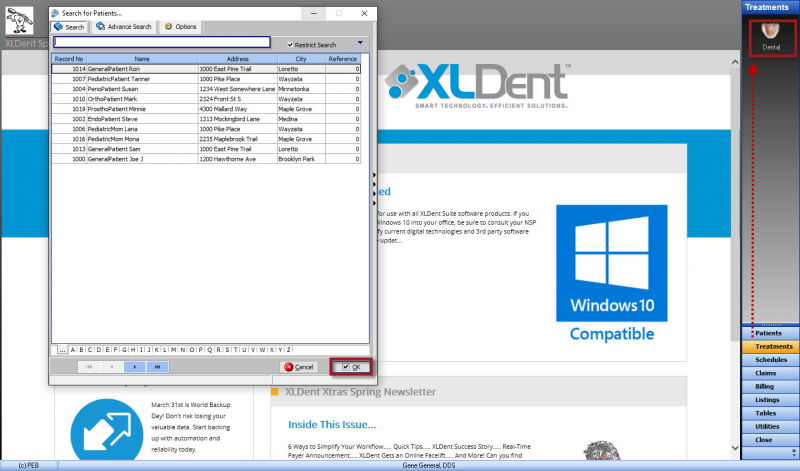
- After logging in, the XLDent Dashboard will serve as your menu to other areas of XLDent. Start by opening a patient’s chart; click on Treatments > Dental > Select a patient.
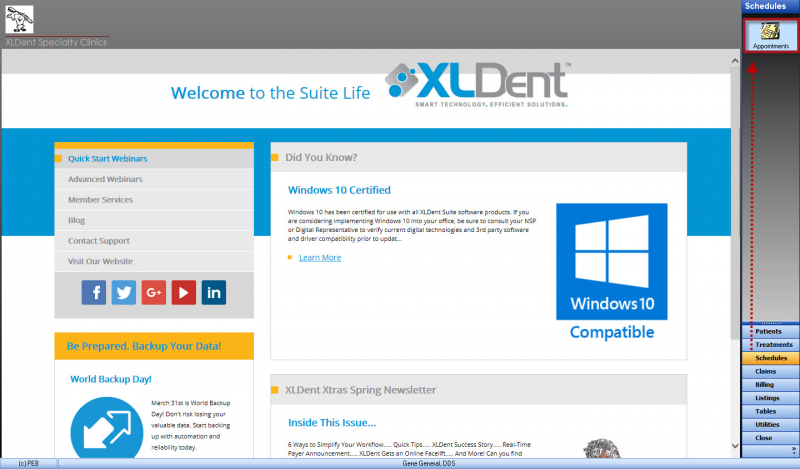
- The appointment book can be accessed by selecting Schedules > Appointments.
Stuck on something? Here are some helpful resources:
- The Quick Start Webinars are designed to help you learn some of the fundamental areas in XLDent. Find these by selecting Quick Start Webinars from the XLDent Dashboard.
- The XLDent Reference Guide shows you how to establish various workflows in XLDent. Looking to Add a Patient, Create a Treatment Plan or Process Insurance? It’s all here. On your desktop, look for the “XLDent Reference Guide” shortcut to open this document.
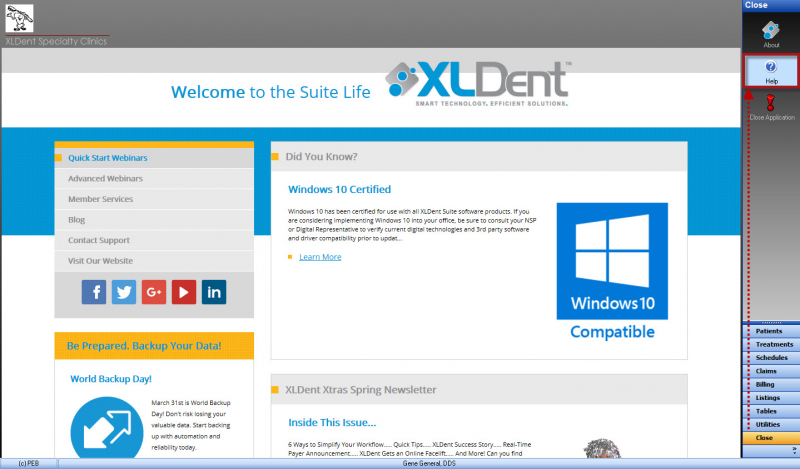
- The XLDent User Guide is the detailed product manual. Use the Contents tab to browse or the Search tab to lookup information by keyword. The XLDent User Guide can be accessed from the Appointment Book (Question Mark Icon), Dental Chart (Help) or from the XLDent Dashboard (Select Close > Help).
- Just want to talk to someone? Call us at 800-328-2925 or email your trial coach. Mention that you have a question about the Trial, so that your call can be properly directed.


Automates key business processes to help you manage your practice more profitably and efficiently.


An innovative treatment Chart which allows for all information to be displayed on one screen for easy viewing.


Stores images from any digital imaging device and integrates them seamlessly to each patient's chart.


Facilitates unattended patient check in and forms completion via a Tablet PC.


Patient and Doctor Portals provide secure internet-based access to the information they want, when they want it.


Interoffice communication finally made simple with instant messaging.


This flexible, easy to use program tracks employee hours effortlessly. Simple to install on one or multiple computers.


All eSolutions are directly integrated with your XLDent Suite to improve workflow, accuracy, and eliminate redundant entry.
Getting Started


nEWS & aNNOUNCEMENTS view blog